Workshop Safety
≈ 9 min read · Print / save as PDF
Three things hurt technicians: electricity from mains power, lithium batteries that catch fire, and heat. Three things kill devices: static electricity, torn cables, and wrong screws. This chapter gives you a habit for each one.
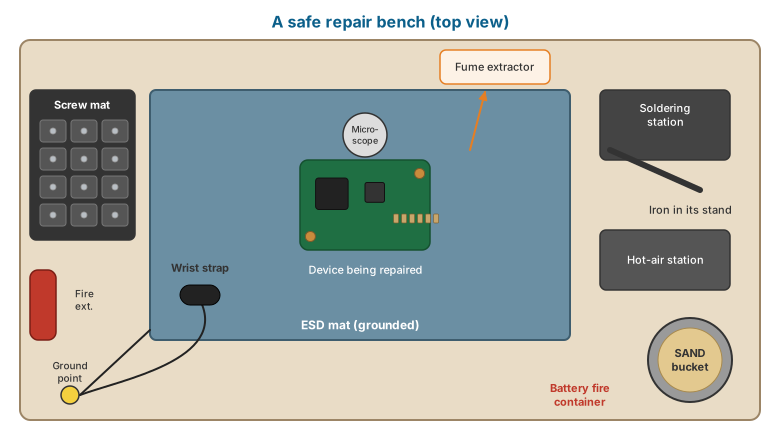
Safety is taught first because the most common injuries in repair shops — burns, lithium-battery fires, cuts from glass, and electric shock from power supplies — are all preventable with habits learned on day one. Equally important is protecting the device: electrostatic discharge (ESD) and careless handling destroy more boards than any other cause.
Electrical shock hazards
Where dangerous voltages exist
| Location | Voltage present | Hazard level |
|---|---|---|
| Wall outlet (Philippines) | 220–230 V AC, 60 Hz | Lethal |
| Inside a desktop power supply (PSU) | Rectified mains ≈ 310–340 V DC on the primary filter capacitor | Lethal, even after unplugging |
| Inside a laptop AC adapter (“brick”) | Same as PSU on the primary side | Lethal — never open a sealed adapter for repair in a basic shop |
| Old CRT monitors | Up to ~25 kV on the anode | Lethal — outside the scope of this book |
| LCD backlight inverters (older CCFL laptops/monitors) | Several hundred to ~1,500 V AC | Dangerous |
| Desktop PSU output, laptop DC side, phone board | 3.3–20 V DC (USB-C PD EPR up to 48 V) | Not a shock hazard, but high current — can burn traces, ignite batteries, and cause burns from shorted metal (rings, watches) |
Rule: Students in this course do not repair the high-voltage primary side of power supplies or AC adapters. Faulty PSUs and adapters are replaced. Opening them is permitted only for observation under instructor supervision, unplugged, with capacitors confirmed discharged.
Safe practices
- Unplug the AC cord before opening any desktop. Switching off at the rear switch is not enough for working inside — many PSUs keep the +5 V standby rail live whenever the cord is connected.
- After unplugging a desktop, press the power button once to drain residual standby energy.
- Remove rings, metal watches and bracelets. A ring across a laptop battery’s terminals can heat to burn temperature in seconds.
- Use one hand when probing anything powered from mains — keeps current from passing across your chest.
- Use a GFCI/RCD-protected outlet strip on the bench if available.
- Never defeat the ground pin on a three-prong plug.
Lithium-ion battery safety
Lithium-ion (Li-ion) and lithium-polymer (Li-Po) batteries are in every laptop and phone you will service. They store a large amount of energy and, when damaged, can enter thermal runaway: an internal short heats the cell, which decomposes the electrolyte, producing more heat and flammable gas, which ignites. Thermal runaway is self-sustaining and cannot be stopped by unplugging anything.
Causes of battery fires in a shop
- Puncture — pushing a pry tool, spudger, or screwdriver into a pouch cell.
- Bending — prying a glued battery out by bending it.
- Crushing — clamping a swollen battery.
- Short-circuit — metal tweezers across the terminals or connector.
- Overheating — hot-air or heat-plate applied too long near the battery.
- Charging damaged cells — connecting a swollen or punctured battery to a charger.
Rules for handling batteries
Prying a glued battery with a metal screwdriver. Even a small dent can start a fire minutes later — on your bench or in the customer’s pocket.
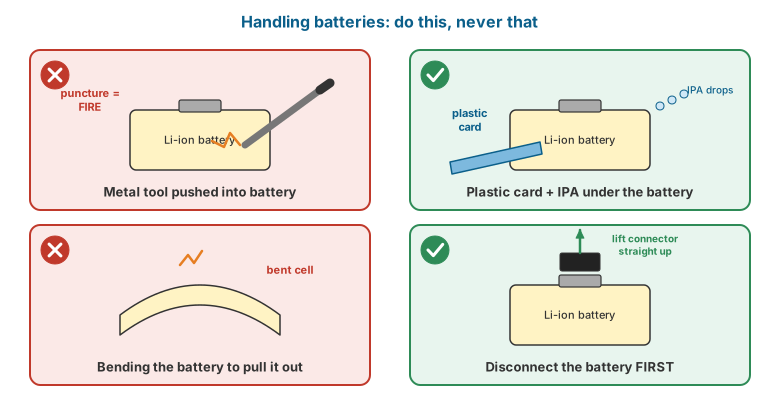
- Disconnect the battery first — before any other work inside a laptop or phone. This is the single most important habit in device repair.
- Use plastic tools near batteries. Never use metal pry tools against a battery.
- Use the manufacturer’s removal method: pull-tab adhesive strips, isopropyl alcohol (IPA) to soften adhesive, or — on recent iPhones — the electrically de-bonding adhesive released by applying a low DC voltage as specified in Apple’s repair manual. (iFixit’s iPhone 17 Pro teardown released the adhesive cleanly by applying power; it also documented a new screwed-in battery tray on that model.)
- Do not reuse a battery that was bent or punctured during removal. Dispose of it safely.
- Swollen batteries must not be charged, pressed, or punctured. Remove them gently, place them in a fireproof container, and arrange proper disposal.
- Keep a battery fire containment setup on every bench (see below).
Fire response equipment
Every bench or shop should have:
- A metal container with sand (a steel bucket of dry sand) for dropping a smoking battery or device into.
- A Class ABC dry-chemical fire extinguisher or a CO₂ extinguisher for the shop. These will put out surrounding materials. For the lithium battery itself, large volumes of water are recommended by many fire services to cool cells and stop propagation to neighbouring cells — but only once the device is unplugged and in a safe location.
- Heat-resistant gloves and long tweezers/tongs for moving a hot device.
- Clear access to an exit.
If a battery starts to smoke, hiss, or swell rapidly: do not touch it with bare hands; move it with tongs into the sand bucket (or outdoors, away from flammables); evacuate the bench area; ventilate. The smoke from lithium-ion fires is toxic.
Heat and burn safety
- Soldering iron tips operate at 300–400 °C. Always return the iron to its stand. Never leave a hot iron on the bench surface.
- Hot-air stations blow air at up to 450–500 °C. Never point a hot-air nozzle at a person or at plastic parts, batteries, or ribbon cables you do not intend to heat.
- Preheaters and heat plates (used to soften phone screen adhesive or to preheat boards) stay hot long after switching off.
- Treat burns with cool running water for 20 minutes; seek medical care for blisters larger than a coin.
Glass, blades and eye protection
- Cracked phone screens and back glass shed sharp fragments. Apply packing tape over cracked glass before working on it.
- Wear safety glasses whenever cutting glass, using a back-glass laser machine, prying a cracked screen, or working with springs and clips that can fly.
- Use a fresh blade in craft knives; dull blades slip.
- Laser back-glass removal machines must be operated with the safety enclosure closed and the correct laser-safety eyewear. Follow the machine manufacturer’s instructions exactly.
Chemicals and fumes
| Chemical | Use | Hazard and precautions |
|---|---|---|
| Isopropyl alcohol (IPA) 99% | Cleaning flux, liquid damage, softening adhesive | Highly flammable — keep away from hot air and open flame; ventilate |
| Flux (rosin or no-clean) | Soldering | Fumes irritate airways — use a fume extractor |
| Leaded solder (Sn63/Pb37) | Soldering | Lead exposure is by ingestion: wash hands before eating, no food on the bench |
| Flux remover / contact cleaner sprays | Cleaning | Flammable propellants; ventilate |
| Adhesive remover (e.g. citrus-based or solvent-based) | Removing screen adhesive | Follow product data sheet |
| Ultrasonic cleaner solutions | Liquid-damage cleaning | Follow product data sheet; never put batteries in the ultrasonic bath |
| B-7000 / T-7000 adhesive | Re-gluing frames and screens | Solvent fumes; ventilate |
Install a fume extractor (activated carbon filter fan) at each soldering station. A small desk fan blowing fumes away from the face is better than nothing, but an extractor that draws fumes into a filter is the standard.
Electrostatic discharge (ESD)
What ESD is
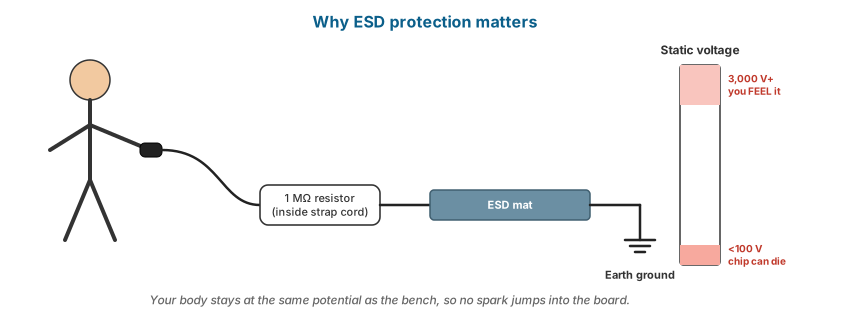
When two materials rub together and separate, electrons transfer and a static charge builds up. A person walking across a floor can accumulate several thousand volts. You can only feel a discharge above roughly 3,000 V, but sensitive semiconductor devices (MOSFETs, CMOS chips, RAM) can be damaged by discharges of under 100 V — far below what you can feel. ESD damage may be immediate (dead component) or latent (a weakened component that fails weeks later, after the customer has picked up the device).
ESD control
| Item | Purpose |
|---|---|
| ESD wrist strap with built-in 1 MΩ resistor | Keeps your body at ground potential; the resistor limits current for your safety if you touch a live circuit |
| ESD mat (dissipative) on the bench, connected to ground | Gives the device a safe surface |
| Ground point | The mat and wrist strap connect to earth ground via a proper ground terminal (not to the bare metal of a powered device) |
| ESD-safe tweezers, brushes and trays | Prevent charge generation during handling |
| Anti-static (shielding) bags | Store and transport boards and modules |
| Humidity | Very dry air increases static; Philippine humidity helps, but air-conditioned rooms can be dry |
Habits:
- Put on the wrist strap before touching any board.
- Hold boards and modules by the edges; do not touch contacts or chip legs.
- Never place boards on carpet, clothing, foam packing, or ordinary plastic bags.
- Test wrist straps regularly with a strap tester.
Mechanical damage to devices
- Ribbon cables and flex cables tear easily. Always lift the connector latch (ZIF or flip-lock) before pulling a cable, and disconnect board-to-board press connectors by prying straight up at the connector, never by pulling the flex.
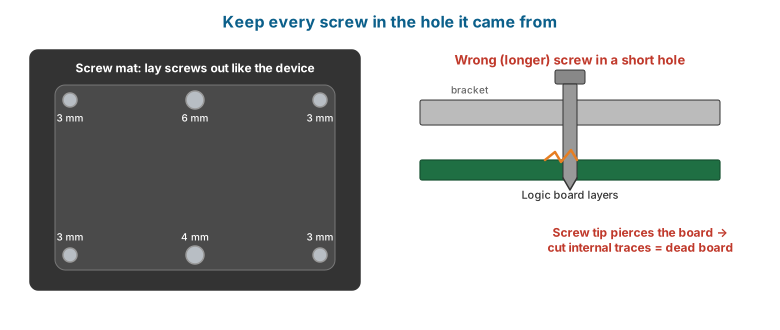
- Screw length matters. In MacBooks, iPhones and many laptops, screws of different lengths are used in different holes. A longer screw driven into the wrong hole can pierce a board layer and destroy it (“long-screw damage”). Use a magnetic screw mat or a printed screw map for every disassembly.
- Do not overtighten — small screws strip their threads in plastic and in thin magnesium/aluminium standoffs.
Watch and read
- Watch: Lithium battery fires: what they look like and how to respond — YouTube search: lithium battery fire repair shop safety
- Watch: Using an ESD wrist strap and mat — YouTube search: ESD wrist strap how to use
Review questions
- Why can a desktop PSU be dangerous even after it is unplugged?
- List four ways a lithium battery can be made to catch fire during repair.
- What is the first step inside any laptop or smartphone repair, and why?
- Why does an ESD wrist strap contain a 1 MΩ resistor?
- Explain “latent” ESD damage and why it matters for customer satisfaction.
- What is “long-screw damage” and how is it prevented?
Lab exercises
Lab 1.1 — Bench setup. Set up a workstation with ESD mat, grounded wrist strap, fume extractor, sand bucket and screw mat. Test the wrist strap. Instructor checks off each item.
Lab 1.2 — Battery handling. Using a discarded (discharged) laptop and phone, locate and disconnect the battery before any other step. Identify the removal method (screws, pull-tabs, adhesive). Do not remove glued batteries yet.
Lab 1.3 — Screw mapping. Fully disassemble a scrap laptop bottom cover and keyboard deck, recording every screw location and length on a screw map. Reassemble with every screw in its original hole.