Running the Shop
≈ 7 min read · Print / save as PDF
Write everything down at intake, get approval before spending the customer’s money, test everything before release, and give a clear written warranty. That is how a shop earns trust.
Choosing a location and layout
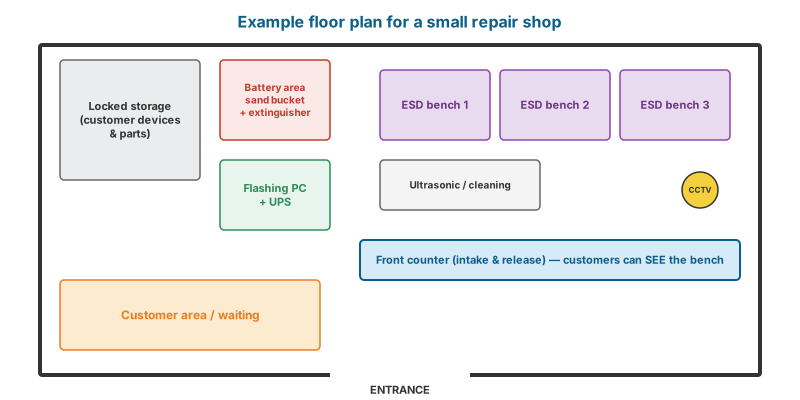
- Location: foot traffic near schools, transport terminals, malls, or dense residential areas; visibility; security; reliable electricity and internet. Being near other phone shops (e.g. mall tech hubs) brings customers but also price competition — compete on quality and warranty.
- Layout: a front counter for intake (customers should be able to see the bench — transparency builds trust), a separate bench area with ESD protection and good lighting, a locked storage area for customer devices and parts, a fireproof battery area with the sand bucket.
- Electrical: dedicated circuits for soldering stations and hot air, surge protection, an uninterruptible power supply (UPS) for flashing and restore work (a power cut mid-flash can brick a device).
Start-up equipment checklist
Use Chapter 3 tiers. Open with Tier 1 + Tier 2. A sensible approach is to buy good quality in the tools you use most (screwdrivers, tweezers, soldering station, microscope, power supply) and to grow into Tier 3 as revenue allows.
Budget worksheet — fill in with current quotes from at least two suppliers:
| Category | Items | Supplier 1 | Supplier 2 |
|---|---|---|---|
| Registration and permits | DTI, barangay, Mayor’s Permit, BIR, SRE accreditation, fire inspection | ||
| Premises | Rent deposit and advance, renovation, signage, furniture, lighting, locks/CCTV | ||
| Tier 1 tools | Screwdrivers, openers, tweezers, multimeter, heat plate, consumables | ||
| Tier 2 tools | Soldering station, hot air, microscope, power supply, fume extractor, ultrasonic cleaner | ||
| Safety | Extinguisher, sand bucket, gloves, glasses, first-aid kit | ||
| Computers and software | Shop PC, laptop for flashing, UPS, repair-information subscription | ||
| Initial parts stock | Fast-moving screens, batteries, ports for the top 10 local models | ||
| Working capital | At least 3 months of rent, salaries and utilities |
Pricing jobs
Basic formula
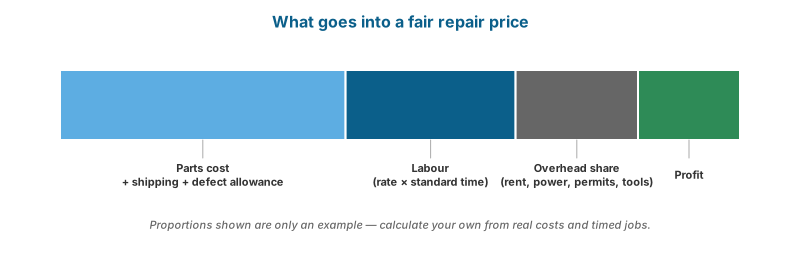
- Parts cost should include shipping and a share of defective parts returned (supplier defect rates are real; track them).
- Labour = your hourly rate × standard time for that repair. Track actual times for each job type to set fair standard times.
- Overhead share = monthly fixed costs (rent, electricity, internet, salaries, permits, subscriptions) divided by the number of billable hours or jobs per month.
- Margin — be competitive but sustainable; cheap prices with no profit lead to poor-quality parts and closure.
Diagnostic fees
Charge a diagnostic fee for board-level and “no power” jobs (deductible from the repair price if the customer proceeds). Quick checks (screen, battery, port cleaning) are usually done free as a goodwill service.
Tiered parts pricing
For screens and batteries, offer clear tiers (e.g. genuine, high-quality aftermarket, economy) with different prices and warranties, written on the job order. Never present an aftermarket part as genuine.
The job workflow
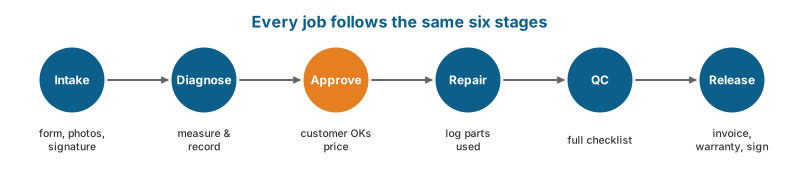
- Intake — fill in the Job Order (Appendix B) with the customer present: customer details, device model, serial/IMEI, accessories received, visible condition (photograph scratches, cracks, dents), complaint, passcode policy, data backup status, Find My / Google account status, estimate and estimated completion date. Customer signs the terms.
- Diagnosis — follow Chapter 5; record findings.
- Approval — contact the customer with the diagnosis, price and time. Do not proceed without approval for any cost above the estimate.
- Repair — log parts used (with supplier and batch for warranty tracking).
- QC — full checklist; attach to the job record.
- Release — demonstrate the repair to the customer, issue the invoice, explain the warranty, get the customer’s signature on the release form, return all accessories.
Warranty policy
Put a tiny marker dot on parts you install. When a device comes back under warranty, you can see at once whether it is your part.
A clear written warranty protects both sides. A typical structure (set your own):
- Coverage: the replaced part and the workmanship, for a stated period (many shops offer 30–90 days depending on part grade; genuine parts may justify longer).
- Exclusions: physical damage after release (drops, cracks, pressure marks), liquid exposure, opening by another technician, software issues unrelated to the repair, and pre-existing faults noted at intake.
- Liquid-damage repairs: limited or no warranty because corrosion can progress.
- Remedy: repair or replace the part; refund at the shop’s option.
Keep warranty seals or markings (e.g. a small marker dot on an internal part) so you can recognise your own installed part.
Customer communication
- Explain in plain language what failed and why.
- Give the customer the old part on request (except batteries, which you should dispose of safely — explain why).
- Send updates by SMS/messaging when delays happen.
- Have a clear unclaimed-device policy in the job order (e.g. notification schedule and storage fees after a stated number of days). Before disposing of or selling any unclaimed device, take legal advice — the shop does not automatically gain ownership.
Parts sourcing
| Source | Notes |
|---|---|
| Manufacturer programmes (Apple IRP / Self Service Repair / distributors where available; Samsung, Lenovo, Dell, HP authorised parts) | Genuine parts, best functionality and pairing support; availability varies by country |
| Local wholesalers and tech hubs | Fast delivery; test quality before buying in bulk |
| Online marketplaces (e.g. Shopee, Lazada) | Wide selection; quality varies widely — buy from sellers with clear returns, check reviews, test on arrival |
| International parts suppliers | Better pricing for volume; consider shipping time and customs duties |
| Donor devices | Useful for rare parts and known-good testing; record source to avoid buying stolen goods |
Test every part on arrival if possible (screens and batteries especially), and record defect rates per supplier.
Inventory management
- Stock the fast-moving parts for the most common local models: screens, batteries, charging ports/flexes, back glass for popular phones; laptop batteries, SSDs, RAM, chargers.
- Use a simple spreadsheet or point-of-sale/inventory app: part, compatible models, quantity, cost, supplier, reorder level.
- Avoid overstocking expensive screens for models that are going out of circulation.
Data privacy
The Data Privacy Act of 2012 (RA 10173) governs how businesses handle personal information; the National Privacy Commission (NPC) enforces it. For a repair shop, good practice includes:
- Collect only what you need (name, contact number, device details).
- Store job records securely; restrict access.
- Never browse customer files, photos or messages. Access only what the repair requires, with the customer’s permission (e.g. to test the camera, use the camera app — don’t open the gallery).
- Ask for passcodes only when necessary for testing; record that you received them; let customers change passcodes after pickup.
- Delete any customer data copied for backup after handover, and document the deletion.
- Have a written privacy notice at the counter and in the job order.
Many smaller businesses have limited NPC registration obligations, but consult the NPC’s current guidance for your situation.
E-waste and battery disposal
Used batteries, boards and screens contain hazardous substances. The Toxic Substances and Hazardous and Nuclear Wastes Control Act of 1990 (RA 6969) and DENR–Environmental Management Bureau rules govern hazardous waste. Good practice:
- Store used lithium batteries separately, terminals taped, in a fire-safe container.
- Hand e-waste and batteries to DENR-registered treatment/recycling facilities or collection programmes; keep records.
- Never throw lithium batteries in ordinary trash — they cause garbage-truck and dump fires.
Growing the business
- Specialise and market it: “iPhone board repair”, “MacBook liquid damage”, “laptop keyboard replacement same day”. Specialists earn more per job than generalists.
- B2B contracts: schools, offices and BPOs need PC and laptop maintenance — recurring revenue.
- Refurbish and resell used devices you legally purchase (verify ownership, check IMEI/serial status, wipe and reset properly, warranty them).
- Online presence: a Google Business Profile, a Facebook page with before/after photos (no customer data visible), and prompt replies to messages.
- Train apprentices with this book’s lab exercises.
Watch and read
- Watch: Running an honest repair business — YouTube search: Louis Rossmann running a repair shop business
- Watch: Repair shop setups in the Philippines — YouTube search: cellphone repair shop setup Philippines
- Read/use: National Privacy Commission — Data Privacy Act guidance for businesses.
- Read/use: DENR Environmental Management Bureau — Hazardous-waste rules and registered treatment facilities.
- Read/use: DTI (Negosyo Centers, BMBE) — Free business counselling and BMBE registration.
- Read/use: TESDA scholarships: TWSP, PESFA, STEP, Tulong Trabaho — Free face-to-face training and free NC assessment; some tracks add allowances, insurance or starter toolkits (STEP). Apply at a TESDA provincial or district office, the scholarship desk of an accredited school, or online via tesda.gov.ph.
Review questions
- List the six stages of the job workflow.
- What should always be recorded at intake?
- Write a sample warranty clause excluding liquid damage.
- List four data-privacy practices for a repair shop.
- How should used lithium batteries be stored and disposed of?